• How to Choose a Portable Power Bank for Travel

    How to Choose a Portable Power Bank for Travel

    A portable power bank is one of the most useful accessories to pack for a trip. It can help keep your phone charged while navigating a new city, checking flight details, taking photos, or staying in touch with family and friends.

    However, not every power bank is suitable for every traveler. Some are compact and lightweight, while others offer greater capacity or faster charging. Choosing the right one depends on your devices, travel plans, and how often you expect to recharge.

    In this guide, we will explain the key features to consider when choosing a portable power bank for travel, including battery capacity, charging speed, size, ports, and airline restrictions.

    1. Choose the Right Battery Capacity

    Battery capacity is usually measured in milliampere-hours (mAh). A higher capacity generally means more stored energy, but it also usually means a larger and heavier power bank.

    Here are some common capacity ranges to consider:

    • 5,000–10,000 mAh: A compact option for short outings, light travelers, or emergency top-ups.
    • 10,000–15,000 mAh: A practical middle ground for many everyday travelers who want a balance between capacity and portability.
    • 20,000 mAh or more: Useful for longer trips or people who need to charge multiple devices, although these models are typically heavier.

    Keep in mind that you will not get the full rated capacity as usable energy delivered to your phone. Some energy is lost during voltage conversion and charging.

    Your phone’s battery size, charging habits, and the power bank’s efficiency all affect how many charges you can get. If possible, compare real-world charging estimates from reliable reviews rather than relying on capacity alone.

    2. Check the Charging Speed

    Battery capacity tells you how much energy a power bank stores. Charging speed tells you how quickly it can deliver that energy to your device.

    Look for a power bank that supports the charging standards used by your phone or tablet. USB Power Delivery (USB PD) is a common standard for fast charging over USB-C.

    Before buying, check these details:

    • The maximum USB-C output wattage.
    • Whether your device supports the same charging standard.
    • Whether the required charging cable is included or sold separately.
    • Whether the power bank can charge more than one device at a time.

    A power bank advertising a high wattage does not automatically mean your phone will charge at that speed. Your device must support the relevant charging capabilities.

    For more information about charging standards and wattage, see our guide to choosing the best USB-C charger for your phone, tablet, or laptop.

    3. Consider Size and Weight

    A power bank may have impressive specifications, but it will be less useful if it is too heavy to carry comfortably.

    For a weekend trip or daily sightseeing, a compact 10,000 mAh model may be sufficient. For camping, long travel days, or charging several devices, a larger model may make more sense.

    Think about where you will carry it. A slim design may fit easily into a jacket pocket or small bag, while a heavier model may be better suited to a backpack.

    If you travel with a small daypack, pay attention to the power bank’s actual dimensions and weight before ordering.

    4. Look at the Available Ports

    The ports determine which devices you can charge and how conveniently you can charge them.

    Many modern power banks include USB-C, while some also have USB-A ports for compatible cables and accessories.

    Consider the following:

    • USB-C: A useful choice for many newer phones, tablets, and other devices.
    • USB-A: May be helpful if you still use older charging cables or accessories.
    • Multiple ports: Convenient when charging a phone and earbuds at the same time.

    Check whether the advertised output is shared between ports. Some power banks reduce the charging speed when multiple devices are connected.

    Also consider whether you want to recharge the power bank through USB-C. A model with convenient input charging can make it easier to use the same type of cable for several devices.

    5. Understand Airline Restrictions

    If you plan to fly, check the power bank’s watt-hour (Wh) rating and the rules of your airline before traveling.

    Many airlines follow limits based on battery energy capacity. A common reference point is 100 Wh, while batteries between 100 Wh and 160 Wh may require airline approval. Rules and exceptions can vary, so always confirm the current requirements for your specific flight.

    Power banks containing lithium batteries generally need to be carried in cabin baggage rather than checked baggage. Airlines may also have rules about using or charging power banks during a flight.

    You can often find the watt-hour rating printed on the power bank or in its product specifications. If only voltage and milliampere-hours are provided, the approximate calculation is:

    Watt-hours = (mAh × voltage) ÷ 1,000

    For example, a battery rated at 10,000 mAh and 3.7 volts has a nominal energy capacity of approximately 37 Wh.

    Do not rely on capacity alone when checking airline eligibility. Review your airline’s current battery rules before departure.

    6. Check Safety and Build Quality

    A travel power bank should be reliable enough to carry regularly. Look for a product from a reputable manufacturer with clear specifications, safety protections, and accessible customer support.

    Useful features may include protection against overcharging, overheating, overcurrent, and short circuits.

    Before purchasing, check:

    • Whether the manufacturer provides clear technical specifications.
    • Whether the product has appropriate safety certifications for your market.
    • Whether independent reviews identify recurring problems.
    • Whether the warranty and return policy are clear.
    • Whether the casing, ports, and cables appear well made.

    Avoid suspiciously cheap products with exaggerated capacity claims or unclear branding. A lower price is not worth the risk of buying a battery product with questionable quality.

    If a power bank becomes swollen, leaks, smells unusual, or gets excessively hot, stop using it and follow the manufacturer’s safety guidance.

    7. Decide Which Extra Features Matter

    Some power banks offer features that make travel more convenient. Whether they are worth paying for depends on your routine.

    Built-in cables: These can reduce the number of accessories you need to pack, although the cable may be difficult to replace if it breaks.

    Battery percentage display: A digital display can make it easier to estimate how much power remains.

    Pass-through charging: Some models can charge a connected device while the power bank itself is charging. Check the manufacturer’s specifications because performance varies.

    Wireless charging: This can be convenient for compatible phones, but wired charging may offer better efficiency or faster charging in many situations.

    Rugged construction: A more durable design may be useful for outdoor trips, provided it does not add unnecessary bulk.

    Choose features that solve an actual problem for you rather than paying extra for specifications you are unlikely to use.

    8. Match the Power Bank to Your Travel Style

    The best capacity and design depend on the kind of trip you take.

    • Short city trips: A compact power bank may be enough for occasional top-ups while using maps and taking photos.
    • Business travel: Consider reliable fast charging and enough capacity to keep your phone and other essential devices running.
    • Long sightseeing days: A 10,000–20,000 mAh model may offer a useful balance between capacity and portability.
    • Camping or remote travel: Higher capacity may be useful when power outlets are limited, but remember to account for weight and airline rules if flying.
    • Travel with multiple devices: Check the number of ports and the total output available when charging several devices simultaneously.

    There is no single capacity that works best for everyone. Think about your devices and how long you typically go without access to an outlet.

    9. Avoid These Common Buying Mistakes

    Before choosing a power bank, watch out for a few common mistakes.

    Buying based on mAh alone. Capacity matters, but charging speed, efficiency, size, and compatibility matter too.

    Ignoring the output wattage. A large battery may still charge your phone slowly if its output does not match your device’s needs.

    Forgetting the cable. Some products do not include every cable you need, so check the package contents.

    Overlooking airline rules. A power bank that works well at home may not meet the requirements for your flight.

    Choosing the cheapest unverified product. Unclear specifications and unreliable safety information are reasons to be cautious.

    Buying more capacity than you need. A very large power bank can add unnecessary weight to your bag.

    Portable Power Bank Buying Checklist

    Before you make a purchase, use this checklist:

    • Capacity matches your daily charging needs.
    • Charging speed is compatible with your devices.
    • Size and weight are comfortable for travel.
    • Ports match the cables and devices you use.
    • Watt-hour rating meets your airline’s requirements.
    • Manufacturer and safety information are clear.
    • Warranty and return policy are available.
    • Price fits your budget.

    Final Thoughts

    Choosing a portable power bank for travel is about finding the right balance between capacity, charging speed, portability, and safety.

    For many travelers, a 10,000 mAh model is a reasonable starting point because it can offer a practical balance between size and capacity. Those who travel for longer periods or charge multiple devices may prefer a larger option.

    Before buying, check your device’s charging requirements, review the power bank’s specifications, and confirm your airline’s current battery rules. A little research can help you choose a power bank that fits your travel routine without adding unnecessary weight to your bag.

    The goal is simple: keep your essential devices powered when you need them, wherever your trip takes you.

  • How to Choose the Best Wireless Earbuds for Everyday Use

    How to Choose the Best Wireless Earbuds for Everyday Use

    Wireless earbuds are a convenient option for listening to music, taking calls, watching videos, and enjoying podcasts throughout the day. With so many models available, choosing the right pair can feel overwhelming.

    Some earbuds focus on sound quality, while others prioritize battery life, comfort, noise cancellation, or call quality. The best choice depends on how you plan to use them and which features matter most to you.

    In this guide, we will explain the key features to consider before buying wireless earbuds.

    1. Consider Sound Quality

    Sound quality should be one of your first considerations when comparing wireless earbuds.

    Different models can produce different sound profiles. Some emphasize bass, while others aim for a more balanced presentation that works well for music, podcasts, and videos.

    Before purchasing, consider the types of audio you listen to most often.

    • For music: Look for a sound profile that suits your preferred genres.
    • For podcasts: Clear voices can make speech easier to understand.
    • For movies and videos: Check whether the earbuds support suitable audio features and low-latency modes when available.

    Remember that more expensive earbuds do not automatically sound better to every listener. Personal preference plays an important role.

    2. Check Battery Life

    Battery life is especially important if you use earbuds during commutes, work sessions, travel, or exercise.

    Manufacturers often advertise two battery figures: playback time from the earbuds themselves and total playback time when using the charging case.

    These figures are not the same.

    For example, a product advertised with up to 30 hours of total playback may include several recharges from its case. The earbuds themselves may operate for considerably fewer hours before needing to be returned to the case.

    When comparing models, check:

    • Playback time on a single charge.
    • Total playback time with the charging case.
    • How long the earbuds take to recharge.
    • Whether quick charging is supported.
    • Whether active noise cancellation affects battery life.

    Actual battery performance varies with volume, settings, usage, and battery age.

    3. Choose Earbuds That Fit Comfortably

    Comfort can make a major difference when wearing earbuds for extended periods.

    Many in-ear models include silicone ear tips in several sizes. A suitable fit can improve comfort, help maintain a secure position, and support consistent sound quality.

    Other models use an open-fit design that does not seal the ear canal in the same way.

    Before buying, consider your preferences and how you plan to use the earbuds.

    If possible, check whether replacement ear tips or different sizes are available. A model with excellent features may not be the right choice if it does not fit your ears comfortably.

    4. Understand Active Noise Cancellation

    Active noise cancellation, often abbreviated as ANC, uses microphones and electronic processing to reduce certain surrounding sounds.

    It can be useful on airplanes, public transportation, or in other environments with steady background noise.

    However, ANC does not eliminate every sound. Its effectiveness varies between models and depends on factors such as fit, design, and the type of noise around you.

    Some earbuds also include transparency or ambient modes. These features allow outside sounds to pass through electronically, which can be helpful when you need to hear announcements or conversations.

    Think about where you will use your earbuds most often before paying extra for noise cancellation.

    5. Look at Call Quality and Microphones

    If you regularly take work calls, attend online meetings, or make phone calls while traveling, microphone quality deserves special attention.

    Earbuds may use multiple microphones and noise-reduction processing to improve voice pickup. However, performance can vary considerably between products.

    When comparing models, look for credible reviews that test microphone performance in quiet rooms and noisy environments.

    Also check compatibility with your phone, computer, and preferred calling applications. Features advertised by a manufacturer may not work identically across every device or operating system.

    6. Check Bluetooth Compatibility and Controls

    Most modern wireless earbuds use Bluetooth to connect to phones, tablets, laptops, and other compatible devices.

    Before purchasing, check the supported Bluetooth version and any device-specific requirements listed by the manufacturer.

    You may also want to consider these features:

    • Multipoint connectivity: Allows supported earbuds to connect to more than one device.
    • Touch or physical controls: Let you manage playback and calls without reaching for your phone.
    • Voice assistant support: Can provide hands-free access to compatible assistant features.
    • Companion apps: May offer equalizer settings, control customization, or firmware updates.

    Do not assume every pair includes all these features. Confirm the specifications for the exact model you are considering.

    7. Consider Water and Sweat Resistance

    If you plan to wear earbuds while walking, running, or exercising, check their water- and sweat-resistance rating.

    Some products have an IP rating that indicates protection against specified levels of dust or water exposure. The exact rating matters, so check the manufacturer’s explanation of what it covers.

    Water resistance does not automatically mean earbuds are waterproof. Avoid exposing them to conditions beyond their stated rating, and follow the manufacturer’s cleaning and maintenance instructions.

    If you exercise frequently, a secure fit and easy-to-clean design may also be important.

    8. Compare Price With the Features You Need

    Wireless earbuds are available at many price points. A higher price may provide additional features, but you should decide which ones are genuinely useful for your routine.

    For example:

    • Everyday listening: Prioritize comfort, dependable connectivity, and satisfactory sound.
    • Commuting and travel: Consider ANC, battery life, and a compact charging case.
    • Work calls: Pay attention to microphone performance and device compatibility.
    • Exercise: Look for a secure fit and an appropriate resistance rating.

    Rather than paying for every available feature, make a short list of your priorities and compare products against that list.

    For more charging-related buying advice, you can also read our guide on how to choose the best USB-C charger for your phone, tablet, or laptop.

    Replace the placeholder above with the actual URL of your first article before publishing.

    Wireless Earbuds Buying Checklist

    Before making a purchase, ask yourself these questions:

    • Do I like the sound profile?
    • Are the earbuds comfortable for my ears?
    • Is the battery life sufficient for my daily routine?
    • Do I need active noise cancellation?
    • Are the microphones suitable for my calls?
    • Will the earbuds work with my devices?
    • Do I need water or sweat resistance?
    • Are the features worth the price?

    Answering these questions can help you compare options more effectively and avoid paying for features you may never use.

    Final Thoughts

    The best wireless earbuds for everyday use are the ones that match your listening habits, comfort preferences, and budget.

    Sound quality, battery life, fit, noise cancellation, microphone performance, and compatibility are all worth considering. Comparing these factors can help you make a more informed decision before buying.

    Take time to check the specifications and read credible reviews of the exact model you are considering. That way, you can choose earbuds that suit your needs rather than relying on price or marketing claims alone.

    Editorial note: Verify product specifications with the manufacturer before recommending a specific model. This guide discusses general buying considerations and does not claim that any particular earbuds have been tested.

  • How to Choose the Best USB-C Charger for Your Phone, Tablet, or Laptop

    How to Choose the Best USB-C Charger for Your Phone, Tablet, or Laptop

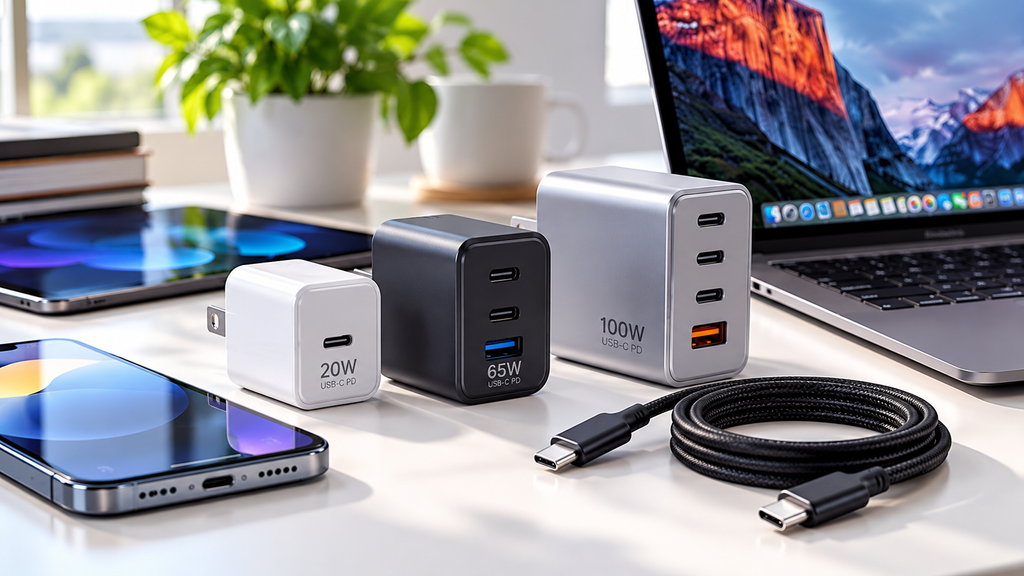
    Pengisi Daya USB C Di Meja Kerja 1 1024x576

    USB-C chargers have become a popular choice for charging phones, tablets, laptops, and other everyday devices. However, not every USB-C charger offers the same charging speed, compatibility, or features.

    Choosing the right charger can help you charge your devices efficiently while avoiding unnecessary spending. In this guide, we will explain what to look for before buying a USB-C charger.

    1. Check the Charging Wattage

    One of the first things to consider is wattage. Wattage indicates how much power a charger can deliver, although your device also determines how much power it can accept.

    Here are some general examples:

    • 20W–30W: Often suitable for smartphones and smaller devices.
    • 45W–65W: Can be suitable for tablets and many laptops, depending on their requirements.
    • 100W or more: May be useful for compatible laptops and multiple-device charging setups.

    These ranges are general guidelines, not guarantees. Always check your device manufacturer’s recommended charging specifications before purchasing a charger.

    A charger with a higher wattage rating does not automatically make every device charge faster.

    2. Look for USB Power Delivery Support

    USB Power Delivery, commonly called USB PD, is a charging standard used by many modern USB-C devices.

    A compatible USB PD charger can negotiate an appropriate power level with a supported device. This helps devices receive the power they are designed to use.

    Some chargers also support Programmable Power Supply (PPS), which can provide additional charging flexibility for compatible devices.

    Before buying, check whether the charger supports the charging standards required by your phone, tablet, or laptop.

    3. Choose the Right Number of Ports

    USB-C chargers come with different port configurations.

    A single-port charger may be sufficient if you mainly charge one phone. A charger with two or more ports may be more convenient if you regularly charge a phone, earbuds, tablet, or laptop.

    However, pay attention to total power output.

    For example, a multi-port charger rated at 65W may distribute that power between connected devices. It may not provide 65W to every port simultaneously.

    Read the manufacturer’s specifications to understand how power is shared when multiple devices are connected.

    4. Do Not Forget the Charging Cable

    A capable charger cannot deliver every supported charging speed if the cable is unsuitable.

    Different USB-C cables have different power capabilities. Some are intended mainly for lower-power charging, while others support higher power levels.

    When buying a cable for a laptop or another high-power device, verify that its power rating meets the device’s requirements. For high-power USB PD charging above 60W, check whether a properly rated 5A cable with the required electronic marking is needed.

    Also remember that USB-C describes the connector type. It does not automatically guarantee a particular charging speed or data-transfer capability.

    5. Consider Size and Portability

    If you travel frequently, the physical size and weight of your charger may matter.

    A compact charger can be convenient for a backpack, laptop bag, or everyday carry setup. Larger chargers may offer more ports or higher power output.

    Think about where you will use the charger most often.

    For home use, a larger multi-port charger may be practical. For travel, a smaller charger with enough power for your main device may be a better fit.

    6. Prioritize Safety and Build Quality

    A charger should be selected for more than price and appearance.

    Look for clear manufacturer information, appropriate electrical ratings, overcurrent and overtemperature protection, and credible safety certification or testing relevant to the market where you live.

    In the United States, you may encounter safety marks from organizations such as UL or ETL. Verify the specific product and certification rather than relying on a logo or a seller’s claim alone.

    Avoid chargers with unclear specifications, suspiciously low prices, or no reliable manufacturer information.

    7. How to Choose the Right Charger for Your Needs

    Before purchasing, ask yourself these questions:

    • What device will I charge most often?
    • What charging wattage does the manufacturer recommend?
    • Does the charger support the required charging standard?
    • Do I need more than one port?
    • Is the cable suitable for my charging requirements?
    • Is the charger from a trustworthy manufacturer with verifiable safety information?

    Answering these questions can help narrow your choices and prevent you from paying for features you do not need.

    Final Thoughts

    The best USB-C charger is not necessarily the one with the highest wattage or the most ports. It is the one that matches your device’s requirements, offers reliable safety features, and fits your daily routine.

    Take a moment to compare the specifications before purchasing. A little research can help you find a charger that offers the right balance of compatibility, convenience, and value.

    Editorial note: Product specifications and safety certifications should be verified with the manufacturer or relevant certification database before recommending a specific model.