
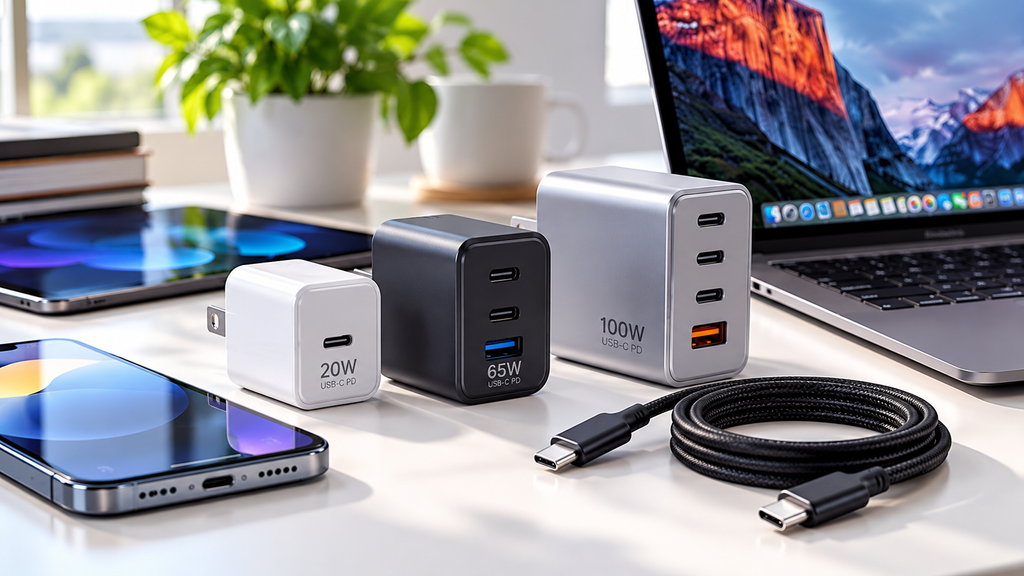
USB-C chargers have become a popular choice for charging phones, tablets, laptops, and other everyday devices. However, not every USB-C charger offers the same charging speed, compatibility, or features.
Choosing the right charger can help you charge your devices efficiently while avoiding unnecessary spending. In this guide, we will explain what to look for before buying a USB-C charger.
1. Check the Charging Wattage
One of the first things to consider is wattage. Wattage indicates how much power a charger can deliver, although your device also determines how much power it can accept.
Here are some general examples:
- 20W–30W: Often suitable for smartphones and smaller devices.
- 45W–65W: Can be suitable for tablets and many laptops, depending on their requirements.
- 100W or more: May be useful for compatible laptops and multiple-device charging setups.
These ranges are general guidelines, not guarantees. Always check your device manufacturer’s recommended charging specifications before purchasing a charger.
A charger with a higher wattage rating does not automatically make every device charge faster.
2. Look for USB Power Delivery Support
USB Power Delivery, commonly called USB PD, is a charging standard used by many modern USB-C devices.
A compatible USB PD charger can negotiate an appropriate power level with a supported device. This helps devices receive the power they are designed to use.
Some chargers also support Programmable Power Supply (PPS), which can provide additional charging flexibility for compatible devices.
Before buying, check whether the charger supports the charging standards required by your phone, tablet, or laptop.
3. Choose the Right Number of Ports
USB-C chargers come with different port configurations.
A single-port charger may be sufficient if you mainly charge one phone. A charger with two or more ports may be more convenient if you regularly charge a phone, earbuds, tablet, or laptop.
However, pay attention to total power output.
For example, a multi-port charger rated at 65W may distribute that power between connected devices. It may not provide 65W to every port simultaneously.
Read the manufacturer’s specifications to understand how power is shared when multiple devices are connected.
4. Do Not Forget the Charging Cable
A capable charger cannot deliver every supported charging speed if the cable is unsuitable.
Different USB-C cables have different power capabilities. Some are intended mainly for lower-power charging, while others support higher power levels.
When buying a cable for a laptop or another high-power device, verify that its power rating meets the device’s requirements. For high-power USB PD charging above 60W, check whether a properly rated 5A cable with the required electronic marking is needed.
Also remember that USB-C describes the connector type. It does not automatically guarantee a particular charging speed or data-transfer capability.
5. Consider Size and Portability
If you travel frequently, the physical size and weight of your charger may matter.
A compact charger can be convenient for a backpack, laptop bag, or everyday carry setup. Larger chargers may offer more ports or higher power output.
Think about where you will use the charger most often.
For home use, a larger multi-port charger may be practical. For travel, a smaller charger with enough power for your main device may be a better fit.
6. Prioritize Safety and Build Quality
A charger should be selected for more than price and appearance.
Look for clear manufacturer information, appropriate electrical ratings, overcurrent and overtemperature protection, and credible safety certification or testing relevant to the market where you live.
In the United States, you may encounter safety marks from organizations such as UL or ETL. Verify the specific product and certification rather than relying on a logo or a seller’s claim alone.
Avoid chargers with unclear specifications, suspiciously low prices, or no reliable manufacturer information.
7. How to Choose the Right Charger for Your Needs
Before purchasing, ask yourself these questions:
- What device will I charge most often?
- What charging wattage does the manufacturer recommend?
- Does the charger support the required charging standard?
- Do I need more than one port?
- Is the cable suitable for my charging requirements?
- Is the charger from a trustworthy manufacturer with verifiable safety information?
Answering these questions can help narrow your choices and prevent you from paying for features you do not need.
Final Thoughts
The best USB-C charger is not necessarily the one with the highest wattage or the most ports. It is the one that matches your device’s requirements, offers reliable safety features, and fits your daily routine.
Take a moment to compare the specifications before purchasing. A little research can help you find a charger that offers the right balance of compatibility, convenience, and value.
Editorial note: Product specifications and safety certifications should be verified with the manufacturer or relevant certification database before recommending a specific model.
Tinggalkan Balasan